Redirections of help topics can be realized by specifying another help file in the first line of a help file. In order for the Help Builder to recognize the redirection, the file extension .nchb must be specified.
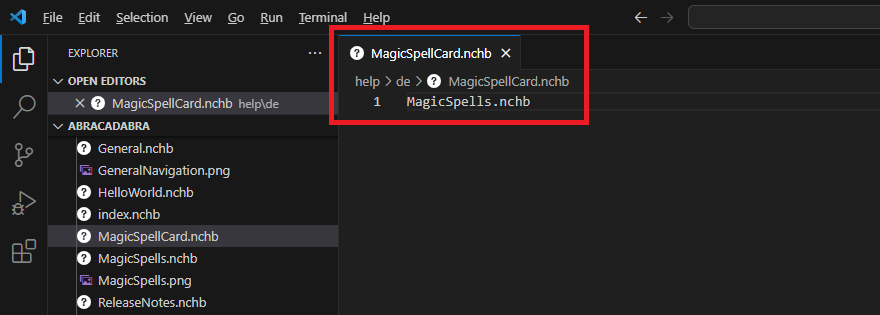
Here, the Magic Spell Card help (ContextSensitiveHelpPage = 'MagicSpellCard') is redirected to the general Magic Spells help (ContextSensitiveHelpPage = 'MagicSpells'). In this case, there should be no help for the Card itself, but the Magic Spells help should be displayed.
If it turns out later that a separate help is necessary for the Card, this can be changed later at any time (without changes to the extension) and all customers have immediate access to the changed/extended help.
Redirects to help topics from other help projects
If a topic from another help project is linked in the table of contents, the AppID of the linked help project must also be specified in square brackets when redirecting to that topic.
Example:
You can also define redirects that leave the current help project and open a different help project instead. This can be useful, for example, if a specific section needs to be described entirely separately in its own help project. To do this, you must specify the AppID of the linked help project in square brackets and three arrows before the filename of the linked help file.
Example:
[>>>NCEX]LicenseManagement.nchb
Note
These help topics (or these .nchb files) should not appear in the table of contents of the current help project or be linked there.


 Topic Redirections
 Here, the Magic Spell Card help (ContextSensitiveHelpPage = 'MagicSpellCard') is redirected to the general Magic Spells help (ContextSensitiveHelpPage = 'MagicSpells'). In this case, there should be no help for the Card itself, but the Magic Spells help should be displayed.
If it turns out later that a separate help is necessary for the Card, this can be changed later at any time (without changes to the extension) and all customers have immediate access to the changed/extended help.
Here, the Magic Spell Card help (ContextSensitiveHelpPage = 'MagicSpellCard') is redirected to the general Magic Spells help (ContextSensitiveHelpPage = 'MagicSpells'). In this case, there should be no help for the Card itself, but the Magic Spells help should be displayed.
If it turns out later that a separate help is necessary for the Card, this can be changed later at any time (without changes to the extension) and all customers have immediate access to the changed/extended help.



