


 EDI Interface Setup
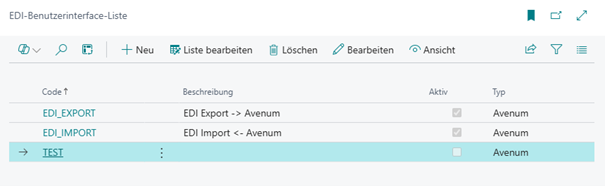 For EDI import and EDI export, separate records are created. The records differ in endpoint, processing direction, and mapping settings:

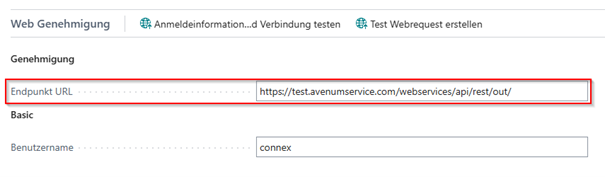 The endpoint specifies where EDI data is stored or retrieved.
In the Web Approval tab, enter the correct credentials for the web service (username + password). This function is provided by the "Web Utility Library" app.
The data exchange definition is specified in the EDI Mapping tab. It is used for processing by EDI type, especially for export and ORDERS import via data exchange definitions (see "Data Exchange Definition Setup"):
The endpoint specifies where EDI data is stored or retrieved.
In the Web Approval tab, enter the correct credentials for the web service (username + password). This function is provided by the "Web Utility Library" app.
The data exchange definition is specified in the EDI Mapping tab. It is used for processing by EDI type, especially for export and ORDERS import via data exchange definitions (see "Data Exchange Definition Setup"):
 The EDI mapping is maintained by EDI type (for example ORDERS, ORDRSP, DESADV, INVOIC), direction, and document type.
For import, additional settings are used to control automatic transfer and follow-up processing:
The EDI mapping is maintained by EDI type (for example ORDERS, ORDRSP, DESADV, INVOIC), direction, and document type.
For import, additional settings are used to control automatic transfer and follow-up processing:
 Each field in the setup includes an individual tooltip to help understand its purpose.
For incoming EDI mappings, the action "Import File" is also available. This allows manual file import without waiting for the job queue. The action is available for all incoming EDI types.
Each field in the setup includes an individual tooltip to help understand its purpose.
For incoming EDI mappings, the action "Import File" is also available. This allows manual file import without waiting for the job queue. The action is available for all incoming EDI types.
| Code | Specifies the code of the interface. |
| Description | Specifies the description. |
| Active | Specifies whether the interface is activated. |
| Type | Specifies the type of the interface. |
| Test Mode | Specifies whether files are processed only and not deleted from the endpoint. |
| Job Queue Codeunit | Specifies the codeunit that processes this EDI interface. |
| Endpoint URL | Specifies the endpoint URL where the data is stored or retrieved. |
| Type | Specifies the type of web service authentication. |
| Username | Specifies the username of the web service. |
| Password | Specifies the password of the web service. |
| Code | Specifies the code of the EDI mapping. |
| Data Exchange Definition Code | Specifies the code of the data exchange definition. |
| Direction | Indicates whether the direction is outgoing or incoming. |
| Document Type | Specifies which document type is used. |
| Quantity Tolerance (%) | Specifies the quantity tolerance used for imported data. |
| Price Tolerance (%) | Specifies the price tolerance used for imported data. |
| Date Tolerance (Days) | Specifies the date tolerance used for imported data. |
| Auto-apply Data | Specifies whether data should be automatically transferred during ORDRSP and DESADV import. |
| Auto-trigger Shipment | Specifies whether the order should be posted automatically during DESADV import. |
| Auto-post Invoice | Reserved for INVOIC import; INVOIC import is currently not fully implemented. |
| Discount Charge Type | Specifies the charge type used to map discount amounts in ORDRSP/INVOIC export. |
| Discount Charge Code | Specifies the charge code used to map discount amounts in ORDRSP/INVOIC export. |
 | XML Builder Export data in XML format (or JSON) via fully configurable schemas. More information  |


