The app contains extensions for Sales Return Order to handle repair and warranty cases more easily.
Current Version:
1.0.0.0as of Business Central 26
Manual
Creation date: 2026/10/25 The current version of this manual can be found at:
☰ Contents
General
App Repair and Warranty Processing The app extends the Sales Return Order with the following options...
Setup
General
Repair and Warranty Setup Contains the general setup for the app...
Repair
Repair - Repair Status Status of the repair in the Return Order process...
Repair - Fault Areas Categorization of the complaint case by area...
Repair - Symptoms Categorization of the complaint case by symptom...
Repair - Faults Depending on the falut area and symptom, problem codes can be set here...
Repair - Conditions Condition of the returned Item...
Tasks
General
Service Contact in Customer In many companies there is a special employee who takes care of complaints to suppliers. This employee can be created as a Contact and entered in the Service Contact No. in the Customer Card. If a Customer has a Service Contact No., then instead of the Contact Code it is transferred automatically to the Sales Return Order...
Retrieve complaint lines A simple way to ensure that the customer is only returning items that they have purchased from the company is to use the function Get Posted Document Lines to Reverse in the Sales Return Order. The app expands this function with an Item No. Filter so that it can be restricted to the Item in question...
Replace / Return Items If an item is replaced or repaired, the Customer will receive a new Item or the repaired Item back. This process can be handeled in the Sales Return Order itself...
Transfer Items Returned items from Sales Return Orders do not always remain in the Location to which they were initially posted. They are often moved from the Return Location to another Location, e.g. back to the main Location, so that the item can be resold...
Incomplete return An item is not always returned by the customer completely with all accessories. In order to identify the missing parts, there is a Missing field in the Sales Return Order...
Return Order Label If items are returned by customers, they usually have to be marked. They are often still the property of the customer, may not be resold and should be returned to the same customer after repair...
Repair Processing
Repair Processing If the company has skilled personnel who are able to repair returned items, then a Sales Return Order can also be seen and used as a repair order. The Sales Return Order and the Sales Return Order Lines contain the field Repair Status with which the progress of the repair can be recorded. In the Repair Status table, a status can be set up as a default value for the field, which is automatically used when the document is created...
Warranty Processing
Warranty Processing A warranty claim often requires different handling than a normal Return Order. There is a Warranty field in the complaint header for differentiation...
Appendix
Release Notes
Docs / Solution / Repair and Warranty Processing / General General
The app extends the Sales Return Order with the following options:
Use of a separate contact person (Contact) for complaints for each customer
Distinction between Return Orders with and without warranty
Functions to replace and transfer Items
Extensions for using the Sales Return Order as a repair order: Repair Status, entry of repair-relevant information
Note
The app does not include resource planning and dispatching support for on-site repairs.
Docs / Solution / Repair and Warranty Processing / Setup / General Repair and Warranty Setup
Contains the general setup for the app.
Salesperson Service
Specifies default Salesperson for Return Orders. If the field is empty the Salesperson from the Customer will be used in the Return Order.
Posted Warranty Cr. Memo Nos.
If the field "Warranty" is true in the Return Order this No. Series ist used for the Posted Cr. Memos. The Number Series must have a relation to the Sales Cr. Memo Nos. in the Sales & Receivables Setup. If the field is empty the standard Nos. for posted Cr. memeos is used.
Service Item Jnl. Template, Service Item Jnl. Batch
Specifies the Item Item Jnl. Template and Item Item Jnl. Batch for the transfer function in the Return Order.
Post Service Item Journal automatically
Specifies if the Post Service Item Journal should be posted automatically.
Warranty Rcpt. Zero Unit Cost
Specifies if Receipts in Sales Return Orders are valueted witz Unit Cost = 0.
Docs / Solution / Repair and Warranty Processing / Setup / Repair Repair - Repair Status
Status of the repair in the Return Order process.
Fields
Code
Specifies the Code of the Repair Status.
Description
Specifies the Description of the Repair Status.
Warranty
Specifies if Return Orders with this Repair Status are Warranty cases. The field "Warranty" in the Return Order will be updated according to this setup.
Initial Status
The Repair Status with this setup will be used as initial Repair Status in the Return Order.
Examples:
Analysis, Repair, Done
Docs / Solution / Repair and Warranty Processing / Setup / Repair Repair - Fault Areas
Docs / Solution / Repair and Warranty Processing / Tasks / General Service Contact No.
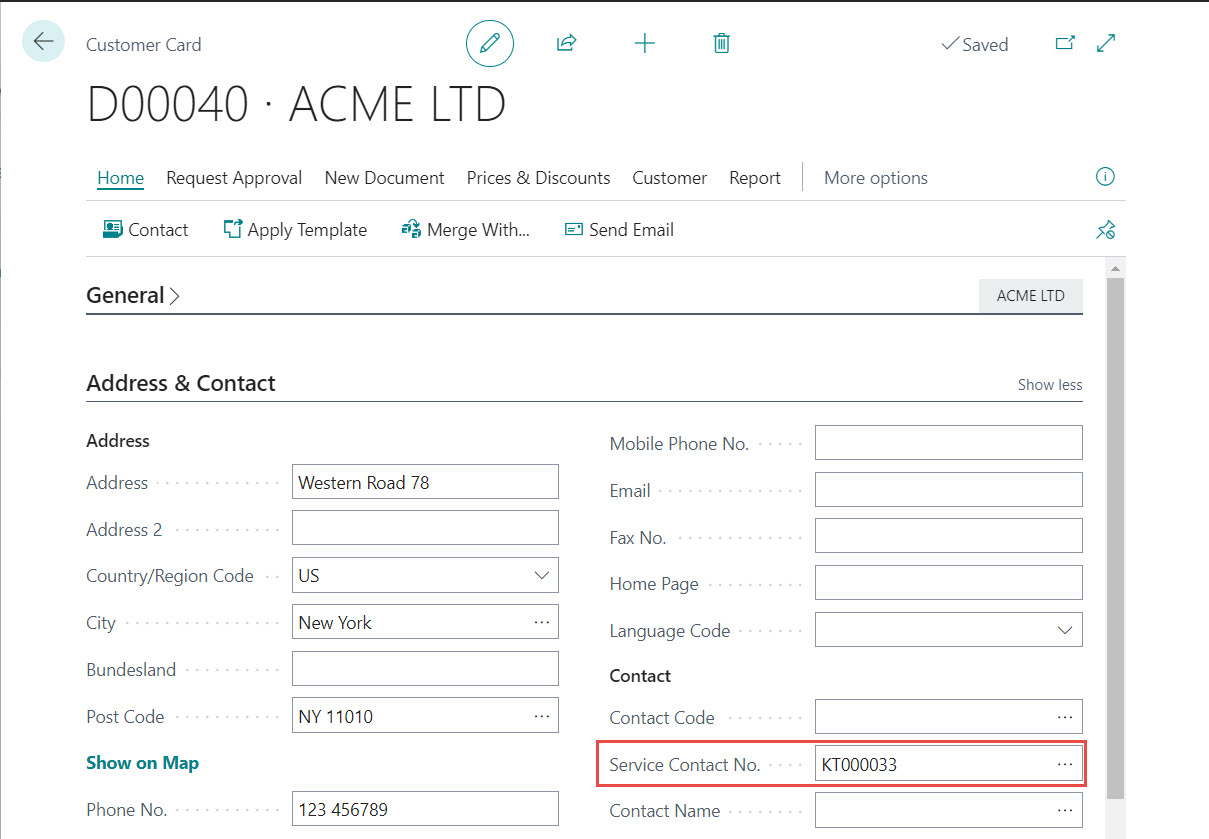
In many companies there is a special employee who takes care of complaints to suppliers. This employee can be created as a Contact and entered in the "Service Contact No." in the Customer Card. If a Customer has a "Service Contact No.", then instead of the "Contact Code" it is transferred automatically to the Sales Return Order.
Docs / Solution / Repair and Warranty Processing / Tasks / General Retrieve complaint lines
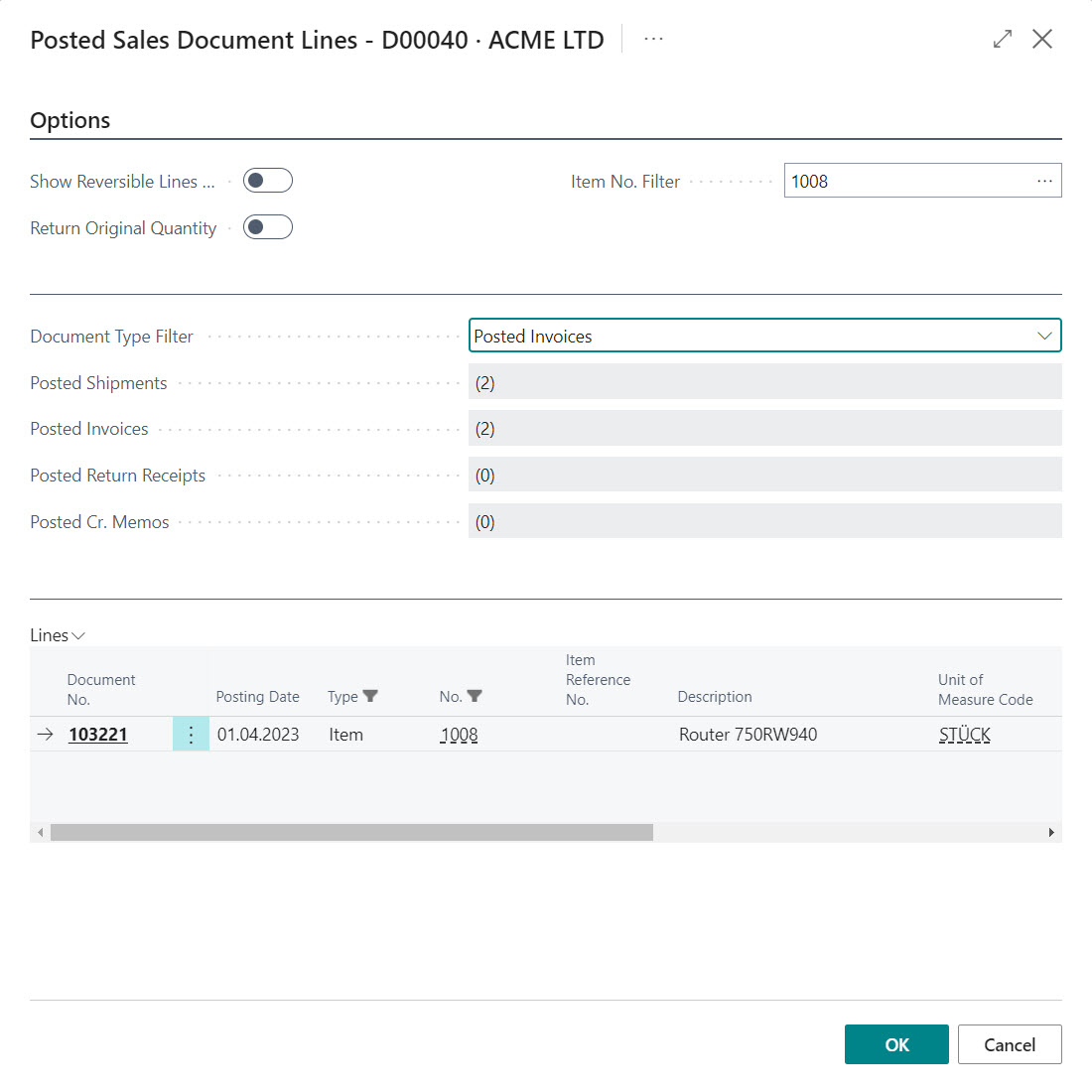
A simple way to ensure that the customer is only returning items that they have purchased from the company is to use the function "Get Posted Document Lines to Reverse" in the Sales Return Order. The app expands this function with an Item No. Filter so that it can be restricted to the Item in question.
Ideally, the capture process would look like this:
The customer provides his data. A Sales Return Order is created with the appropriate customer.
The customer indicates which Item he would like to return. The function "Get Posted Document Lines to Reverse" is called and filtered with the Item No. Filter. All document lines that entitle you to a return are displayed in the overview.
The appropriate line is selected and transferred to the Sales Return Order. If necessary, the quantity is adjusted and further information about the problem and symptoms is recorded.
Docs / Solution / Repair and Warranty Processing / Tasks / General Replace and return Items
If an item is replaced or repaired, the Customer will receive a new Item or the repaired Item back. This process can be handeled in the Sales Return Order itself.
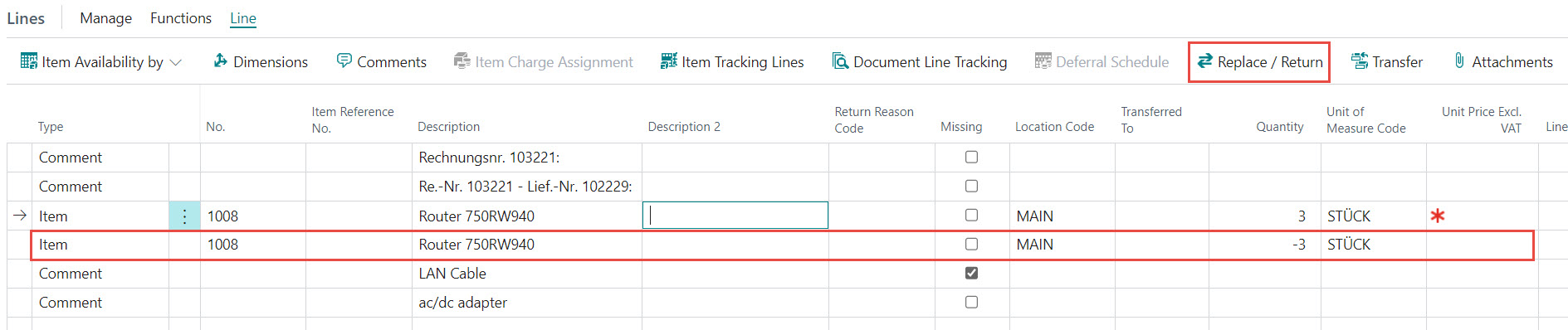
The "Replace / Return" function creates a new document line with the same data as the original line, but with a negative quantity. That makes it possible to process the delivery to the Customer.
The advantage of this process is that fewer documents are required to process the Return Order, resulting in greater clarity. Return and delivery can be billed together in one document and the effort involved in reconciling customer balances can be reduced.
The disadvantage of this process is that the delivery to the Customer must have a value that is less than or equal to the return. In such a case, separate documents must be entered, since no negative Credit Memo can be posted.
Note
The function cannot currently be used with item tracking.
Docs / Solution / Repair and Warranty Processing / Tasks / General Repair - Transfer To Location
Returned items from Sales Return Orders do not always remain in the Location to which they were initially posted. They are often moved from the Return Location to another Location, e.g. back to the main Location, so that the item can be resold.
With the "Transfer" function, this process can be triggered directly from the Sales Return Order.
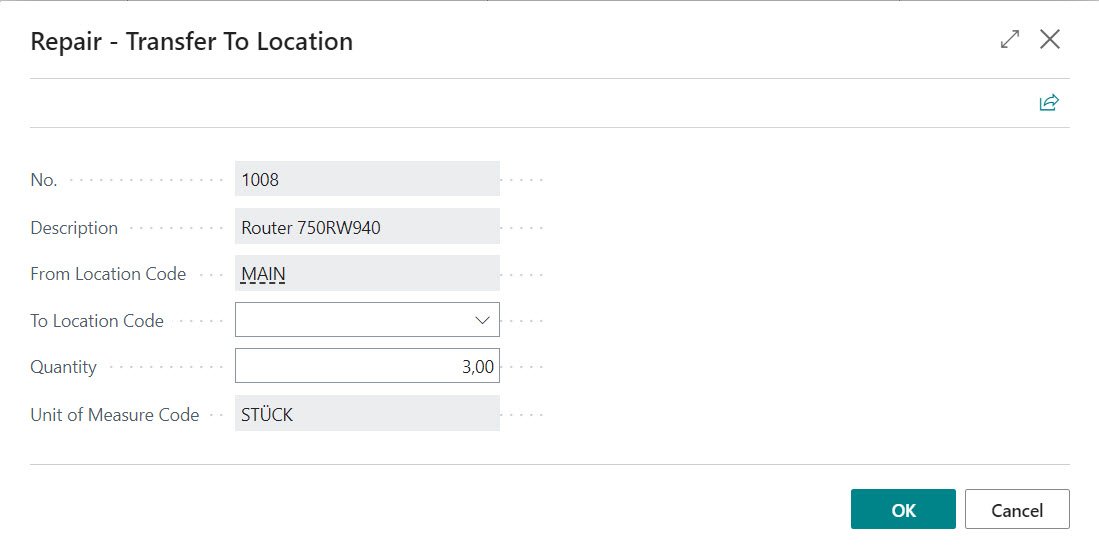
The window Repair - Transfer To Location opens when you call up the "Transfer" function, where the destination Location and quantity for transfer can be recorded.
After confirming with OK either the item journal opens or the item journal lines will be posted automatically. Template, journal name and the posting automation are set up in the App Setup.
Fields
No.
Specifies the Item No. to be transferred.
Description
Specifies the Description of the Item to be transferred.
From Location Code
Specifies the source Location Code to transfer from.
To Location Code
Here you have to enter the Location to which the article is to be transferred.
Quantity
Must be less than or equal to the quantity already returned.
Unit of Measure Code
Is preassigned with the unit from the Return Order Line.
Two journal lines are automatically created: a line with "Entry Type" = "Negative Adjmt." with the "From Location Code" and a line with "Entry Type" = "Positive Adjmt." with the "To Location Code". No real transfer journal line is generated because that would cause the Unit Cost to carry over to the new Location. If the return was made with a Unit Cost = 0, then the item would also have a Unit Cost = 0 in the new Location. In this way, you can control the valuation in the new Location yourself.
Note
The function cannot currently be used in conjunction with item tracking.
Docs / Solution / Repair and Warranty Processing / Tasks / General Incomplete return
An item is not always returned by the customer completely with all accessories. In order to identify the missing parts, there is a "Missing" field in the Sales Return Order.
The components from the scope of delivery are written in text form (e.g. using a Standard Text) in the Return Order Lines. Those parts that are missing are marked with a "Missing" in the row.
When creating the Return-Related Documents, the indicator is also transferred to the Purchase Return Order.
Docs / Solution / Repair and Warranty Processing / Tasks / General Return Order Label
If items are returned by customers, they usually have to be marked. They are often still the property of the customer, may not be resold and should be returned to the same customer after repair.
A simple "Return Order Label" can be printed in the Sales Return Order, which contains the following data:
If the company has skilled personnel who are able to repair returned items, then a Sales Return Order can also be seen and used as a repair order. The Sales Return Order and the Sales Return Order Lines contain the field "Repair Status" with which the progress of the repair can be recorded. In the "Repair Status" table, a status can be set up as a default value for the field, which is automatically used when the document is created.
The Sales Return Order Lines also have additional fields for managing information relevant to the repair:
Fault Area
Specifies the area where the problem occurs.
Symptom Code
Specifies the symptoms of the problem.
Fault Code
Specifies the identified fault.
Remark Fault Area
Add here remarks about the Fault Area.
Condition
Specifies the Condition of the Item.
Remark Condition
Add here remarks about the Condition.
Remark
Add here general remarks.
Warranty
Specifies if the Return Order Line is a Warranty case.
Missing
Specifies if the component is missing. It is used only for Comment lines.
When creating the Return-Related Documents, this information is also transferred to the generated purchasing and sales documents as well as to the posted sales documents and the sales archive.
A warranty claim often requires different handling than a normal Return Order. There is a "Warranty" field in the complaint header for differentiation.
The field can be automatically updated via the Repair Status. The "Warranty" indicator is passed on to the document lines in the Sales Return Order. It cannot be overridden in the lines, i.e. Items from warranty cases cannot be used together with Items from other business cases in one document.
The indicator is transferred to the posted return receipt, the posted credit memo, the item ledger entries and the customer ledger entries during posting and can therefore be evaluated separately. When creating Return-Related Documents, the indicator is also transferred to the purchase documents.
In contrast to normal Sales Return Orders, the following logic applies to warranty Return Orders:
The Sales Price is always = 0 because there are no refunds/payments for the customer
Depending on the "Warranty Rcpt. Zero Unit Cost" setup, the Unit Cost is also always = 0, since the item may still be owned by the customer.
The posted credit memos always have the document total = 0 and are posted in a separate number range if a corresponding number series is set up in the "Posted Warranty Cr. Memo Nos." field.
Would you like to know what has changed in the extension? Below you'll find an overview of the new features and changes made in the updates.
Build-Overview in DevOps



 General
 Ideally, the capture process would look like this:
 The advantage of this process is that fewer documents are required to process the Return Order, resulting in greater clarity. Return and delivery can be billed together in one document and the effort involved in reconciling customer balances can be reduced.
The disadvantage of this process is that the delivery to the Customer must have a value that is less than or equal to the return. In such a case, separate documents must be entered, since no negative Credit Memo can be posted.
The advantage of this process is that fewer documents are required to process the Return Order, resulting in greater clarity. Return and delivery can be billed together in one document and the effort involved in reconciling customer balances can be reduced.
The disadvantage of this process is that the delivery to the Customer must have a value that is less than or equal to the return. In such a case, separate documents must be entered, since no negative Credit Memo can be posted.
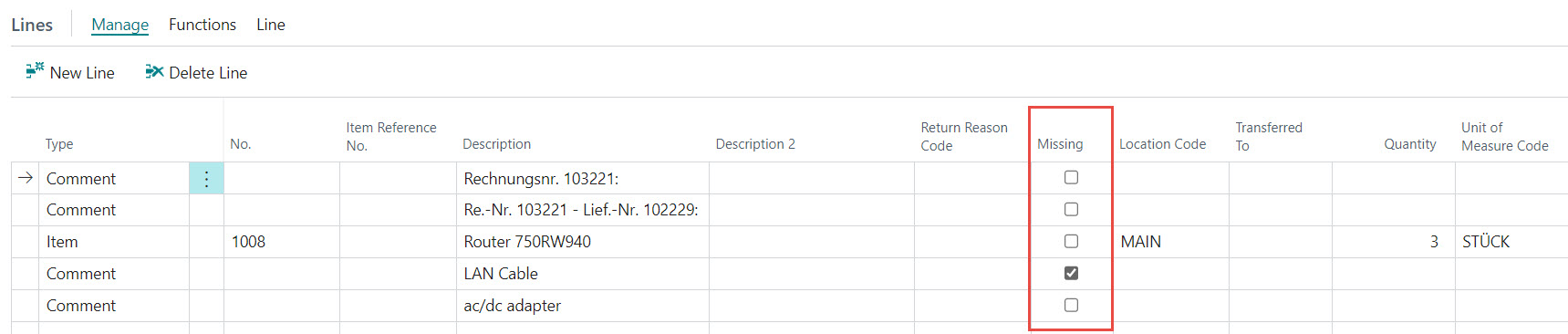 The components from the scope of delivery are written in text form (e.g. using a Standard Text) in the Return Order Lines. Those parts that are missing are marked with a "Missing" in the row.
When creating the Return-Related Documents, the indicator is also transferred to the Purchase Return Order.
The components from the scope of delivery are written in text form (e.g. using a Standard Text) in the Return Order Lines. Those parts that are missing are marked with a "Missing" in the row.
When creating the Return-Related Documents, the indicator is also transferred to the Purchase Return Order.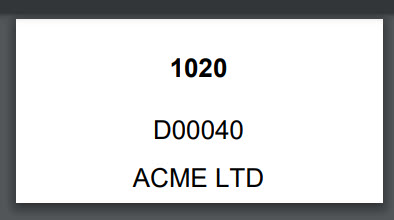
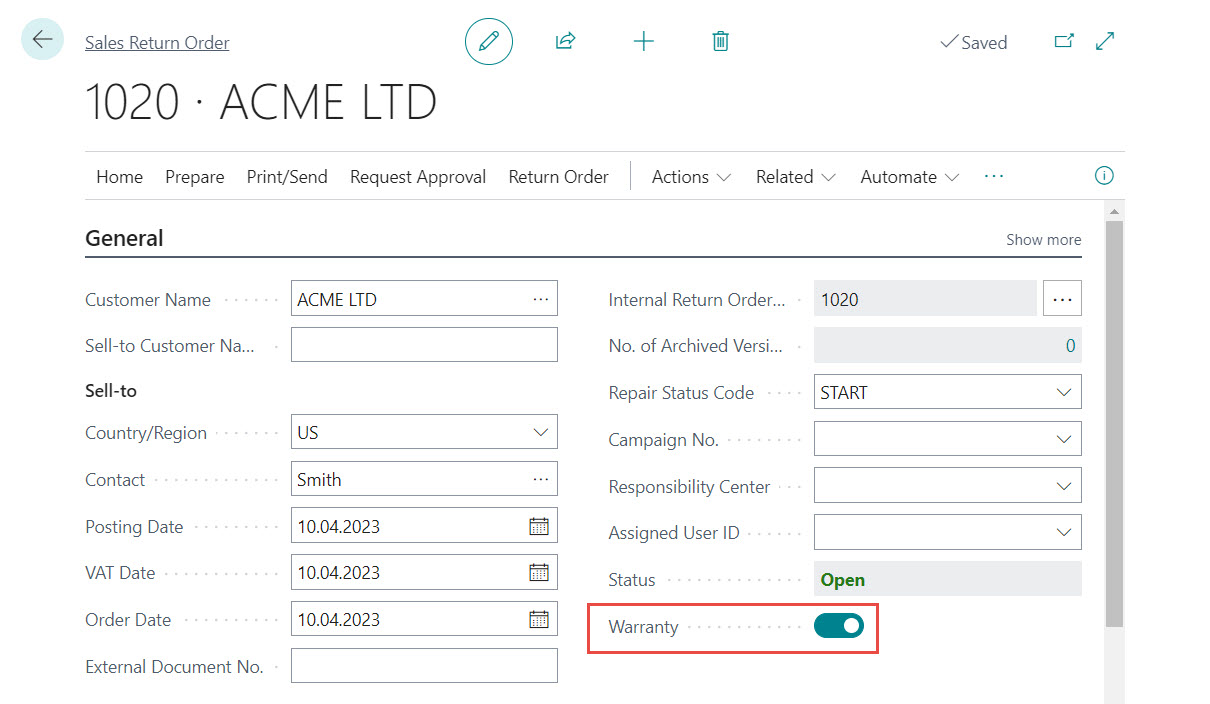 The field can be automatically updated via the Repair Status. The "Warranty" indicator is passed on to the document lines in the Sales Return Order. It cannot be overridden in the lines, i.e. Items from warranty cases cannot be used together with Items from other business cases in one document.
The indicator is transferred to the posted return receipt, the posted credit memo, the item ledger entries and the customer ledger entries during posting and can therefore be evaluated separately. When creating Return-Related Documents, the indicator is also transferred to the purchase documents.
In contrast to normal Sales Return Orders, the following logic applies to warranty Return Orders:
The field can be automatically updated via the Repair Status. The "Warranty" indicator is passed on to the document lines in the Sales Return Order. It cannot be overridden in the lines, i.e. Items from warranty cases cannot be used together with Items from other business cases in one document.
The indicator is transferred to the posted return receipt, the posted credit memo, the item ledger entries and the customer ledger entries during posting and can therefore be evaluated separately. When creating Return-Related Documents, the indicator is also transferred to the purchase documents.
In contrast to normal Sales Return Orders, the following logic applies to warranty Return Orders:

