| Docs Help
  AppSource  
Docs  /  Solution  /  BBG Interface  /  Tasks

 Working with the App


2026/04/21 • 3 min. to read

Function BBG Setup

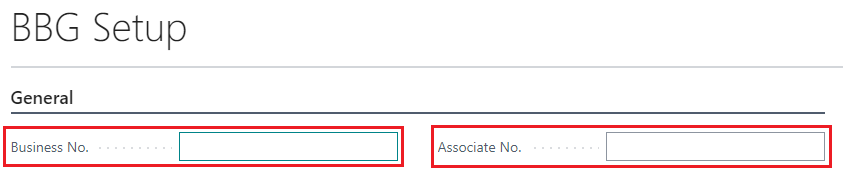
Company-specific BBG information, such as business number or associate number, can be defined in the BBG Setup for the interface.

New Fields

Customer Card

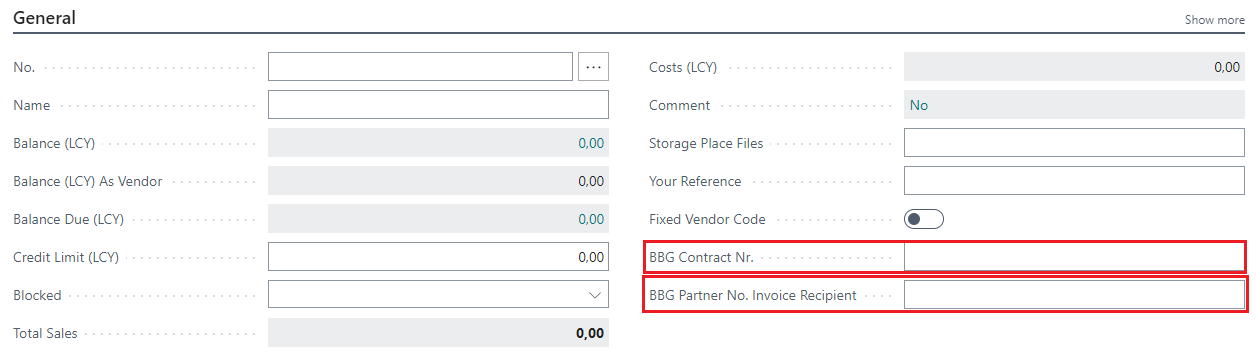
"BBG Contract Nr." and "BBG Partner No. Invoice Recipient" were added to the Customer Card. The fields can be found in the "General" groupe.

Sales Order

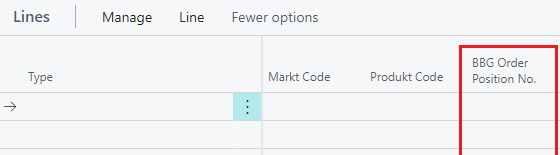
"BBG Order Position No." was added to the Sales Order Card. The field can be found in the "Lines".

Posted/Unposted Sales Invoice

"BBG Order Position No." was added to the Posted/Unposted Sales Invoice Card. The field can be found in the "Lines".

Posted/Unposted Sales Credit Memo

"BBG Order Position No." was added to the Posted/Unposted Sales Credit Memo Card. The field can be found in the "Lines".

Service Item Worksheet

"BBG Order Position No." was added to the Service Item Worksheet Card. The field can be found in the "Lines".

Servicezeilen

"BBG Order Position No." has been added to the "Service Lines".

Posted/Unposted Service Invoice

"BBG Order Position No." was added to the Posted/Unposted Service Invoice Card. The field can be found in the "Lines".

Posted/Unposted Service Credit Memo

"BBG Order Position No." was added to the Posted/Unposted Service Credit Memo Card. The field can be found in the "Lines".

New Actions

The new actions were added to the card and list pages. In the lists the actions only work for the single selected record.

Posted Sales Invoice

BBG Invoice Export

Exports the posted sales invoice as a XML file in BBG form.

Send BBG Invoice E-Relation

Send an email with the invoice as attached xml file to the bbg-invoice e-relation receiver.

Posted Sales Credit Memo

BBG Credit Memo Export

Exports the posted sales credit memo as a XML file in BBG form.

Send BBG Invoice E-Relation

Send an email with the credit memo as attached xml file to the bbg-invoice e-relation receiver.

Posted Service Invoice

BBG Invoice Export

Exports the posted service invoice as a XML file in BBG form.

Send BBG Invoice E-Relation

Send an email with the invoice as attached xml file to the bbg-invoice e-relation receiver.

Posted Service Credit Memo

BBG Credit Memo Export

Exports the posted service credit memo as a XML file in BBG form.

Send BBG Invoice E-Relation

Send an email with the credit memo as attached xml file to the bbg-invoice e-relation receiver.

Related information


Submit feedback for
DE|EN Imprint