This app enables a VAT statement for DE across multiple companies.
Current Version:
1.0.0.0as of Business Central 23
Manual
Creation date: 2026/10/23 The current version of this manual can be found at:
☰ Contents
General
App "Collected VAT DE" The Collected VAT DE app provides the option to generate a VAT Statement DE across multiple companies. This is accessed from a specific client (VAT group). If multiple VAT groups are needed, they can be set up in different clients...
Setup
App Setup In the VAT group company, where the German VAT settlement is to be processed, ensure all relevant companies are selected by marking the checkbox in the Collected VAT DE column...
Tasks
Working with the App You can review the consolidated VAT settlement before generating the file...
Appendix
Release Notes
Docs / Solution / Collected VAT DE / General General
The Collected VAT DE app provides the option to generate a VAT Statement DE across multiple companies. This is accessed from a specific client (VAT group). If multiple VAT groups are needed, they can be set up in different clients.
In the VAT group company, where the German VAT settlement is to be processed, ensure all relevant companies are selected by marking the checkbox in the Collected VAT DE column.
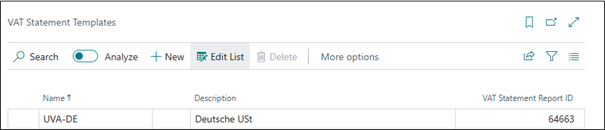
In the VAT Statement Template, report 64663 must be assigned in the VAT group company. To do this, display the column VAT Settlement Report ID.
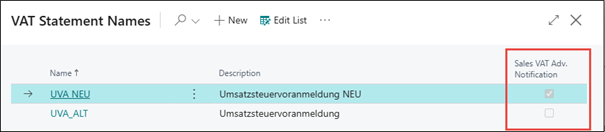
In the VAT Statement Names, the VAT return to be used is selected.
Docs / Solution / Collected VAT DE / Tasks Working with the App
You can review the consolidated VAT settlement before generating the file.
Select the function Show Amounts from XML file.
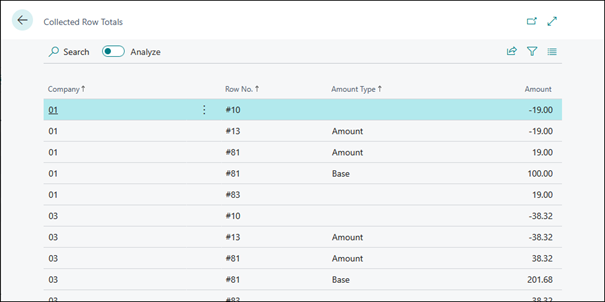
You will receive an overview of the category numbers, sorted by clients.
Tip
If you want to sort this overview by Row No., for example, simply click on this column in the heading.
The displayed values take into account VAT items from all clients according to the setup.
Please note the following points:
The status of VAT entries (open/closed) must be correctly set in all companies.
Each consolidated company must have the VAT Statement fully configured.
The VAT Statement setup in all companies must match that of the VAT group company.
Totals for each code are calculated separately in each company and then combined in the VAT group company.
You can start the consolidated file directly from the Sales VAT Adv. Notif. Card in the VAT group company.
Select the Create XML - Collected DE function:
In the XML File option, you can choose between:
Create
Create and Export
The generated file will include VAT entries from all companies based on the configuration.
Please note the following points:
The status of VAT entries (open/closed) must be correctly set in all companies.
Each consolidated company must have the VAT Statement fully configured.
The VAT Statement setup in all companies must match that of the VAT group company.
Totals for each code are calculated separately in each company and then combined in the VAT group company.
Calculate and Post VAT Settlement function cannot be executed across multiple companies.
The XML file created is stored in the download folder for further processing.
Would you like to know what has changed in the extension? Below you'll find an overview of the new features and changes made in the updates.
Build-Overview in DevOps



 General
 In the VAT Statement Template, report 64663 must be assigned in the VAT group company. To do this, display the column VAT Settlement Report ID.
 In the VAT Statement Names, the VAT return to be used is selected.
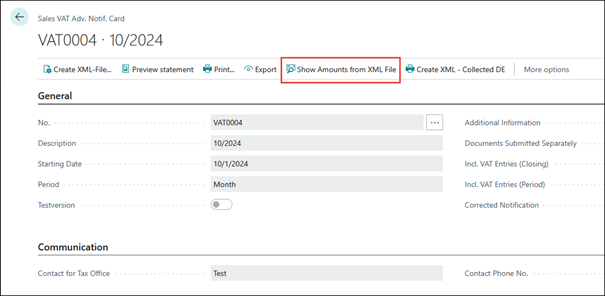 Select the function Show Amounts from XML file.
You will receive an overview of the category numbers, sorted by clients.
Select the function Show Amounts from XML file.
You will receive an overview of the category numbers, sorted by clients.

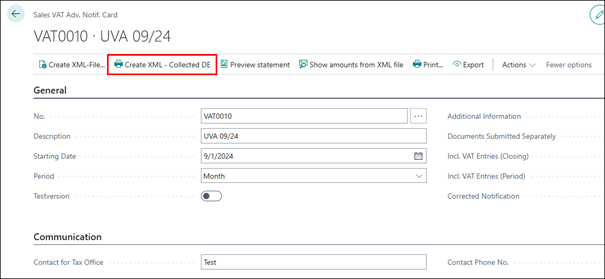 Select the Create XML - Collected DE function:
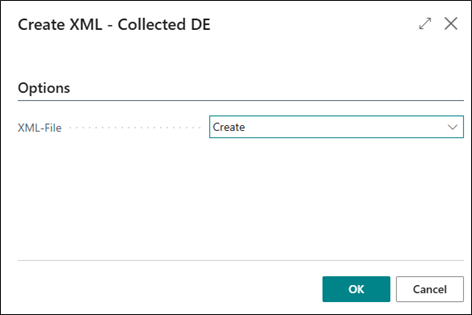 In the XML File option, you can choose between:

